
THE education site for computer science and ICT
2. Records
If you are storing data permanently in a file, you should structure the file in such a way that you can sort through, read, and write data into it again later.
In additon to creating your own custom file format, you may also want to use some mainstream data files as well, such as pdf, mp4, jpg.
Each popular file type has a published internal file format. For example a PDF file contains a very specific structure. This means that if a computer programmer wants their software to read or write a pdf file, then they must include in their application, subroutines (or libraries) designed specifically for reading \ writing pdf files. Usually, it is easier to purchase the requisite code library rather than re-code the whole thing from scratch. The same applies to mp4, jpg, xlsx, docx and so on.
Files consist of a number of records, which are a type of data structure similar to an array. Just like an array, a record is a collection of connected pieces of data. Each piece of data is its own field within the record. Records within the same file will often have similarly-organised data, so it is relatively simple to sort the records by the data in each field. For example, here is a snip of a file containing records of items sold by a shop:
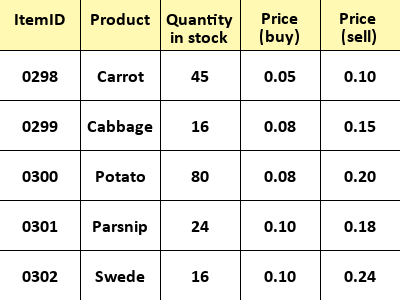
Each row in the table represents a single record. Each box (other than the headers) represents a single field. The fields are organised into columns.
The first set of fields, labeled 'ItemID' are the unique identifier for the record. No two records should share the same ID, as it is how we can identify each one.